
What it does
It counts the movements you feel, saves each session, and shows your own sessions as a 7-day chart, a calendar and a list. The numbers are the ones you tapped in.
A baby kick counter for iPhone. Tap for each movement, save the session, and review your counts by day, week and month. A tracking tool, not medical advice.
Free to download. Counting needs a Pro subscription, and the App Store paywall shows the price and any free trial before you pay.
Screens show sample data.
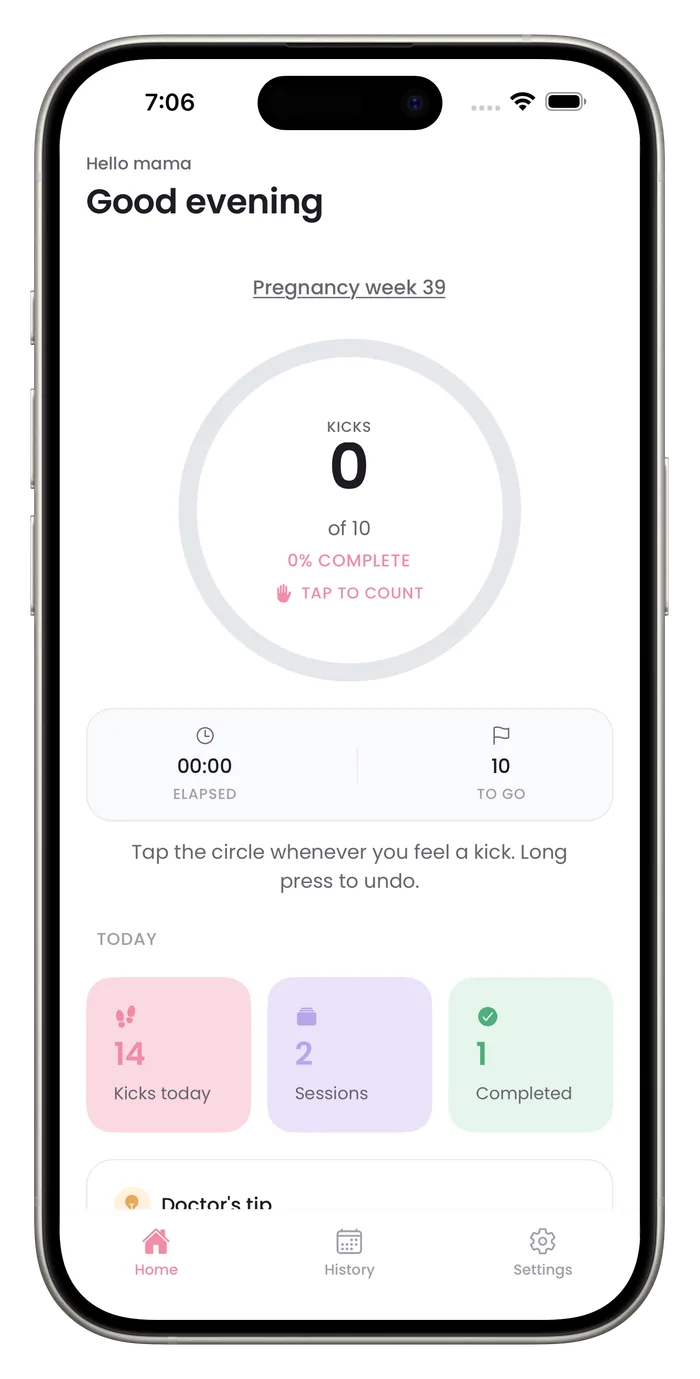
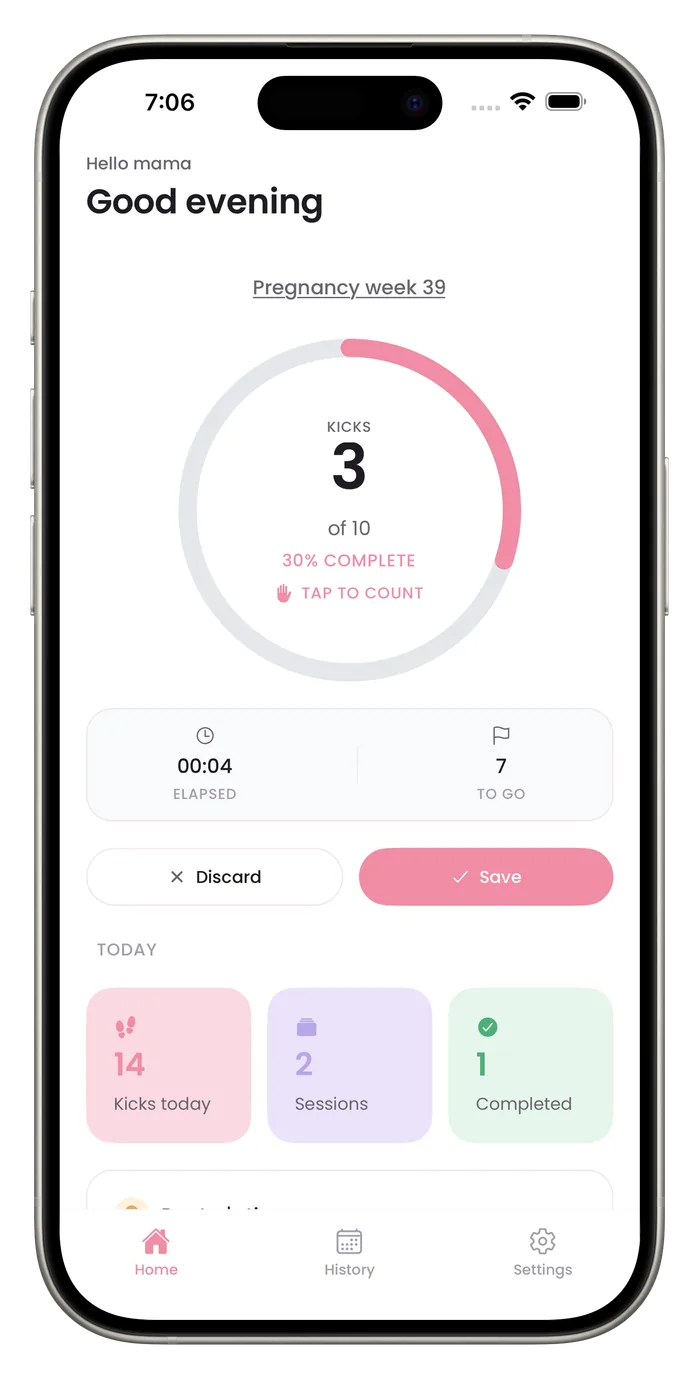
Tap the circle every time you feel a movement. The ring fills toward your goal, and the clock shows how long the session has run.
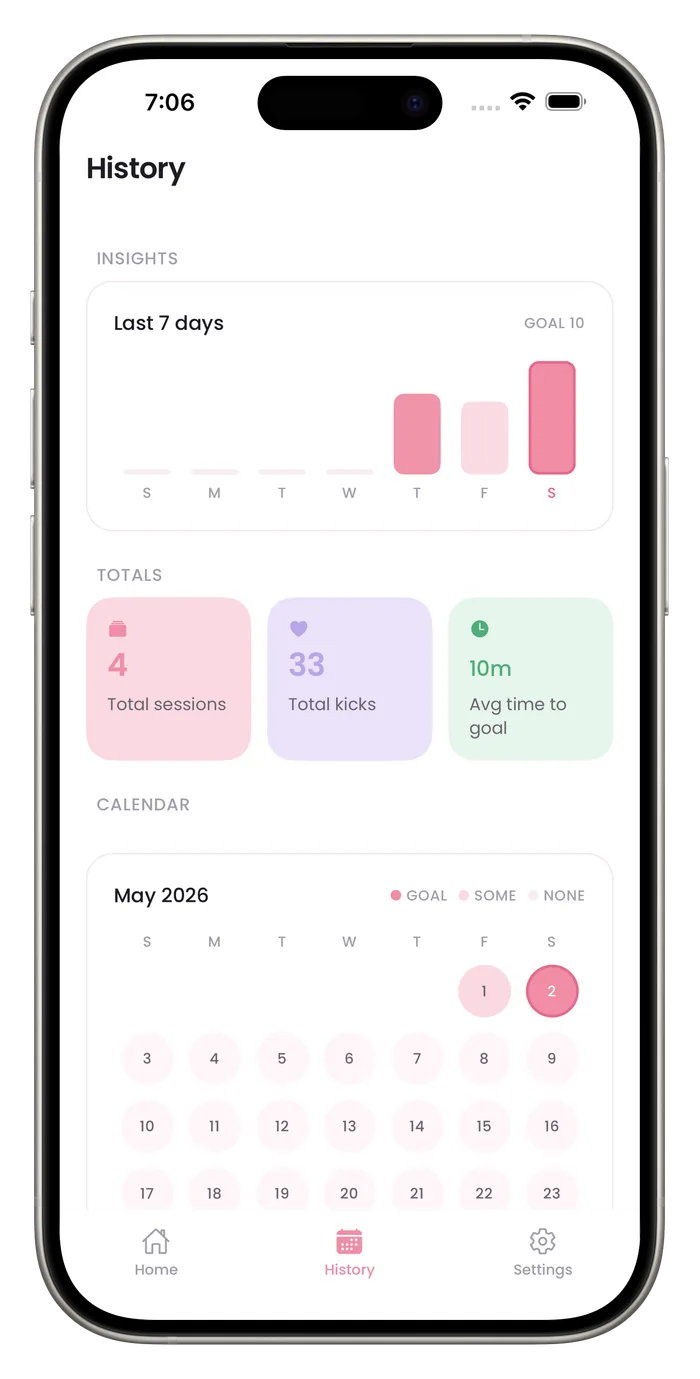
Your last 7 days appear as a bar chart, and bars that reach your goal are a darker pink. Totals cover all your saved sessions, and a calendar of the current month marks each day as goal reached, some kicks, or none.
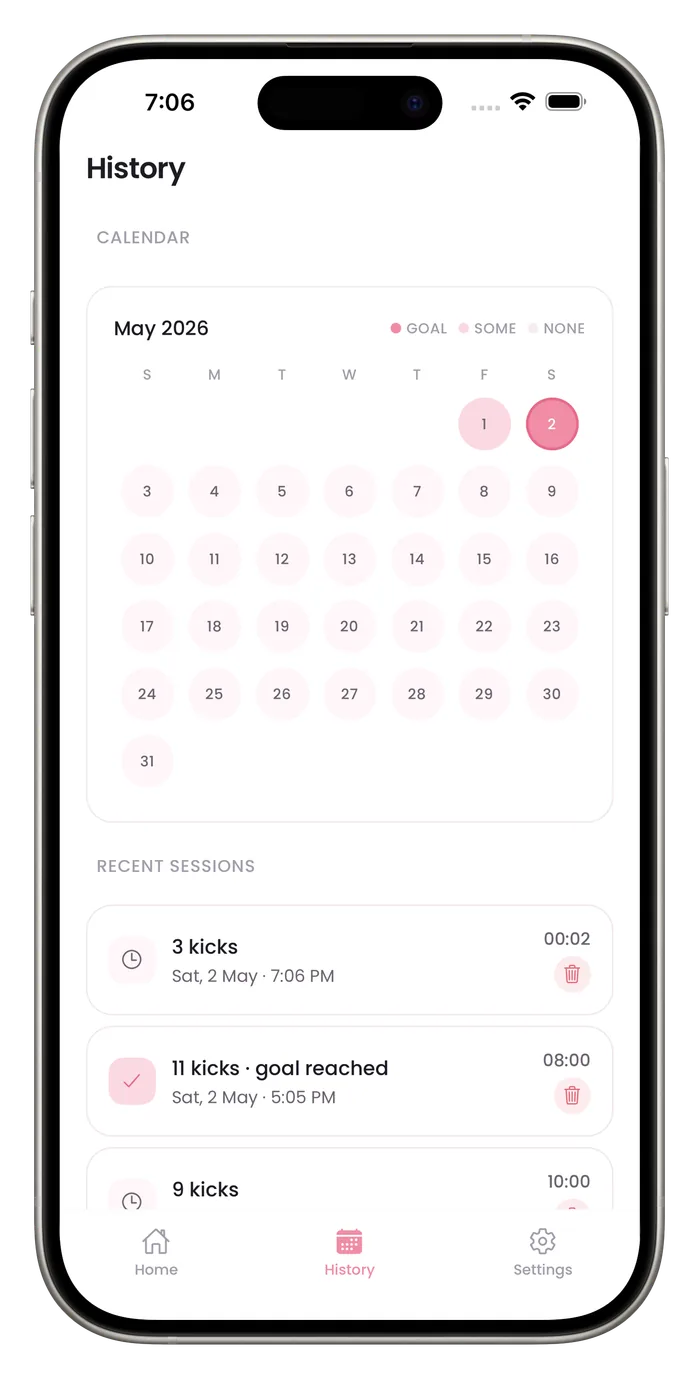
Your 8 most recent sessions list their date, time, duration and kick count. Ask your provider what they want you to track, and bring the history to your next visit.
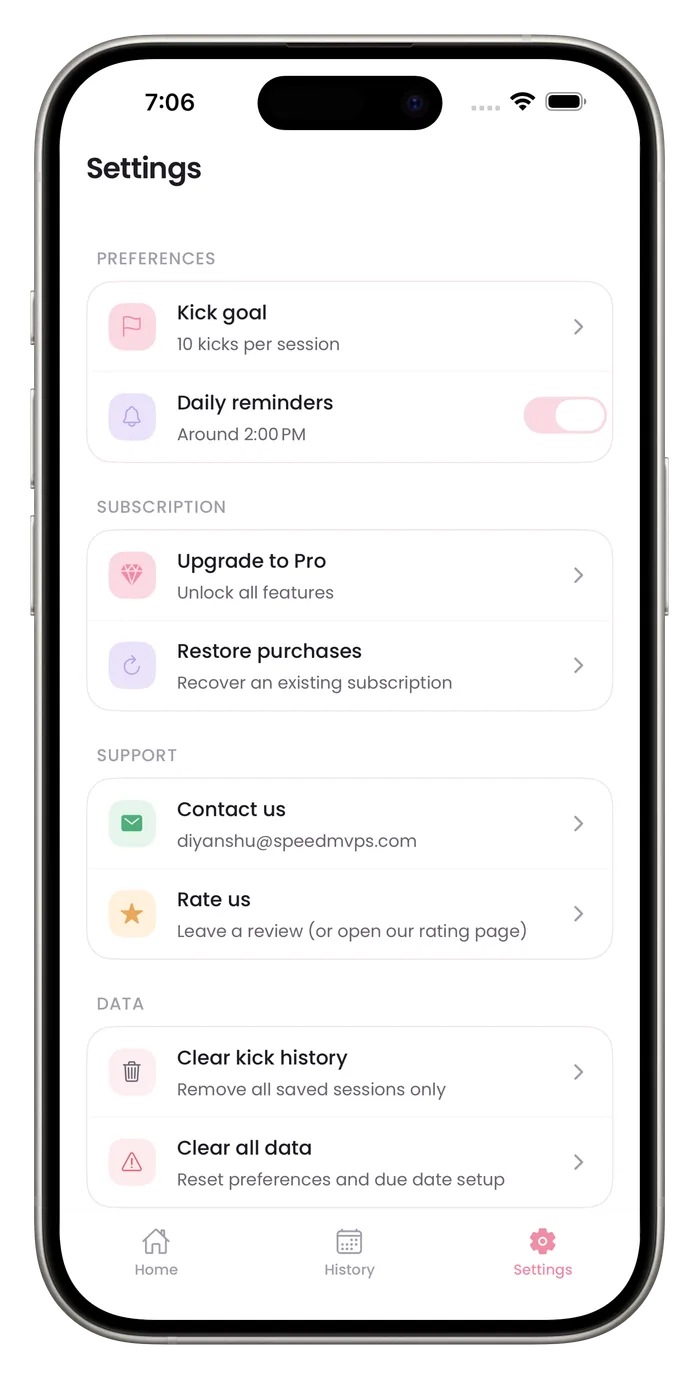
The default goal is 10 kicks per session. Set 8 or 12 in Settings if your provider suggests a different number.
Your kick sessions are stored on your iPhone and you never create an account. The app does send usage events to analytics, purchase and ad measurement services, and the privacy policy lists them.
Turn on the daily reminder and choose the time. It sends one notification a day. If you allow notifications, the app can also send trial and plan-ending messages, plus tips and nudges for subscribers, and you can turn all of them off in iPhone Settings.
The counter is one large circle, and each tap gives light haptic feedback, so you can count without studying the screen.
Switch languages in Settings, including Spanish, French, German, Arabic, Japanese and Portuguese. The counter, most of History, Settings and the daily reminder are translated. The Listen tab (a separate sound recorder), the tab labels and some other parts are still in English.
See the full list and what is still in EnglishSettings can clear only your saved sessions, or reset everything, including your due date and preferences.
It counts the movements you feel, saves each session, and shows your own sessions as a 7-day chart, a calendar and a list. The numbers are the ones you tapped in.
It cannot tell you whether your baby is well. A count is a record, not a result. If movements feel reduced or different from usual, contact your midwife, doctor or maternity unit straight away, without waiting to finish a session.
Bumpi Kicks is made by Speed AI Labs LLP. Write to diyanshu@speedmvps.com with questions or corrections.
Read the facts about the app, how we write and check our pages and what the privacy policy says about your data.
Bumpi Kicks is an iPhone app for counting your baby's movements. You tap a circle each time you feel one, save the session, and review your counts as a 7-day chart, a calendar of the current month and a list of sessions. On the App Store it is listed as Baby Kick Counter: Count Kicks.
The app is free to download, but counting needs a Bumpi Kicks Pro subscription. The App Store paywall shows the price and any free trial before you pay, and you can cancel in your iPhone settings.
No. It is a tracking tool and cannot tell you whether your baby is well. It is not intended to diagnose, treat, cure or prevent any condition. If movements feel reduced or different from usual, contact your midwife, doctor or maternity unit straight away.
No. There is no sign-up, email or password. Setup asks for your first name, why you are counting, what you find hardest and your due date, and a subscription screen follows. Counting needs a Pro subscription.
As of October 13, 2026, Bumpi Kicks is not on Google Play. It is on the App Store for iPhone, and it also runs on iPad.
You can switch the app between 32 languages in Settings, including Spanish, French, German, Arabic, Japanese and Portuguese. The App Store lists English only, and some parts, such as the Listen tab (a separate sound recorder) and the tab labels, are still in English. The languages page, under Features, has the full list.
Open the app and tap the circle each time you feel a movement. The ring fills toward your goal, and a clock shows how long the session has run. Long press the circle to undo a tap you made by mistake. When you reach your goal, the app saves the session for you.
Yes. The default goal is 10 kicks per session, and Settings lets you choose 8, 10 or 12. If your midwife or doctor gave you a number, follow them.
Counting methods vary, so ask your midwife or doctor. Our guides summarize published advice and list their sources, including a guide to the 10-in-2 method and one on when to start.
Contact your midwife, doctor or maternity unit straight away. Do not wait to finish a count and do not rely on an app to decide. Our guide on reduced movement lists the sources.
If you turn it on, the app sends one daily reminder at a time you choose from five options in Settings. The reminder is optional, and the app schedules two weeks of reminders each time it opens. If you allow notifications, the app can also send other messages: before a free trial ends, before a cancelled plan ends, and tips and nudges if you have subscribed. The Daily reminders switch controls only the daily reminder, and you can turn off all notifications for Bumpi Kicks in iPhone Settings.
Kick sessions, your due date and your settings are stored on your iPhone. The app also sends usage events to analytics, subscription and ad measurement services, and the privacy policy lists each one.
Kick counts and recordings are not sent to Meta, the ad measurement service. Kick counts and session lengths are sent to our analytics service, tied to a random identifier rather than your name.
Settings can clear your saved sessions only, or Clear all data, which also deletes your recordings, name, due date and setup answers, sets your kick goal, reminder and other settings back to their defaults, and restarts setup. It keeps the random app user ID and a few internal app flags. To ask about analytics data already sent, email support.
Bumpi Kicks keeps a simple log of your kick counts that you can look back on and show your care team.
Free to download. Counting needs a Pro subscription, and the App Store paywall shows the price and any free trial before you pay.